
Overview
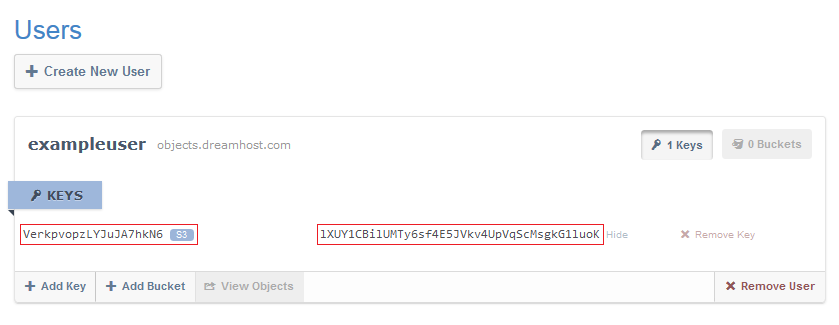
Each DreamObjects user has at least one key pair, which the panel uses to access your buckets and objects. A key pair consists of the following:
a 20-character Access Key (similar to a username for a bucket), and
a 40-character Secret Key (similar to a password for a bucket, generated automatically).
How do I view my keys?
To view your keys, click your username.
The Secret Key does not display by default. Click the Show Secret Key link to view the Secret Key.
Most third-party clients like Cyberduck, as well as APIs and tools written using the API, also use these credentials to access the DreamObjects programmatic cluster.
A user can have multiple keys to provide fine-grained access.
Removing a key pair removes access for any application using it.
Copying your Access Key
As a convenience, when you click an Access Key or Secret Key the text is selected (though not copied to the clipboard). Once the key is highlighted, you can copy it.
Windows
Ctrl + C to copy.
Ctrl + V to paste.
Mac

(Command key) + C to copy.
(Command key) + V to paste.
How do I add a key pair?
Navigate to the DreamObjects page in your DreamHost panel.
Either collapse your user object or scroll to the bottom of your expanded user object to find the User Controls.
Click the Add Key button. An S3 key is immediately added to your user.
How do I delete a key pair?
Deleting a key pair results in a loss of access for all clients and scripts that have been using that key pair.
Navigate to the DreamObjects page in your DreamHost panel.
Navigate to the key pair you want to delete and locate the Remove Key button on the right-hand side of that row.
Click the Remove Key button. A confirmation dialog box opens.
Click the Remove button. The key pair is deleted.
