
Overview
Unix permissions control what access is granted to each file and directory on your website. Every file/directory has three types of owner, and each owner has its own set of permissions.
The following article explains how to change permissions via SSH or FTP:
Owners
The following are the three types of owners of a file or directory.
User — Owner of the file. This is most often the user that uploaded or created it.
Group — A group that can contain multiple users that have the same access to the file/directory.
Public — This can be thought of a World permissions. Anyone who visits your site to view a file.
Permissions
Each owner then has three permissions to the file or directory. These are:
Read (r)— Gives the owner the ability to read and open the file or view the directories contents.
Write (w) — Gives the owner the ability to edit the contents of the file, or manage files in a directory and to delete the directory (when empty).
Execute (x) — Gives the owner the ability to run the file or navigate within the directory.
Owner and Permission breakdown
When put together, the three permissions for each owner look like this.
| Owner | Permissions |
|---|---|
| User | Read Write Execute |
| Group | Read Write Execute |
| Public | Read Write Execute |
These can then be viewed on the server via SSH, or using an FTP client.
How do I view permissions via SSH?
If you log into your server via SSH, you can run ls -la to view permissions. For example:
[server]$ ls -la
drwxrwxr-x  4 exampleuser pg5034488   4096 Apr  9  2024 example.com
-rw-r--r--  1 exampleuser pg5034488      0 Apr  9  2024 test.txt
lrwxrwxrwx  1 bob        webmasters     11 Apr 11  14:08 link -> dir
The permissions are displayed horizontally. To the far left of each file or directory name, there are ten characters which show the attributes and permissions of the file. The first column indicates whether the entry is a:
directory (d),
a regular file (-), or
a symbolic link (l).
The other nine characters are organized into three groups of three:
| (drwxr-xr-x) | The first group of three characters are the owner permissions. (You are the owner of your files). |
| (drwxrwxr-x) | The second group of three characters are group permissions. These permissions are shared by others users in your same group. |
| (drwxr-xr-x) | The third group of three characters are public permissions for anyone else (such as the public). |
For a link, the mode always sets all permissions. That is, since the symbolic link acts like the file or directory it points to (e.g., cd link above would change you into dir), the permissions of the destination are the permissions that are really in effect.
How do I view permissions in an FTP client?
In an FTP client, permissions for a file would be displayed as follows:
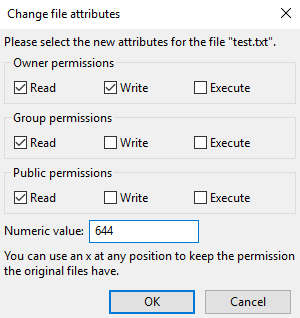
This menu can be viewed by right-clicking on the file and then clicking File permissions....
How do I change permissions?
View the following article for information on changing your file or directory permissions:
